11 Costly Google Ads Mistakes Landscaping Companies Make
Landscaping companies spend thousands of dollars on Google Ads every month. This guide highlights 11 of the most common and costly issues we find inside real Google Ads campaigns, why they matter, and how to fix them.
Where Landscaping Google Ads Campaigns Go Wrong
Landscaping companies spend thousands of dollars on Google Ads every month.
Unfortunately, many accounts we review have money quietly leaking away because of small mistakes inside the account.
This guide highlights 11 of the most common and costly issues we find inside real Google Ads campaigns, why they matter, and how to fix them.
Use it to quickly spot problems, clean up your setup, and make sure your budget is going toward the clicks that actually turn into real projects.
1. Wrong Bidding Strategy
Problem
Google is moving more and more towards smart bidding strategies (Max Conversion, tCPA, tROAS, etc.). These bidding strategies each require a minimum amount of data in order to optimize. These are machine-learning algorithms. If you select the wrong strategy in your account you may end up optimizing for the wrong customer.
Why It Hurts
- Smart bidding needs clean conversion data and enough volume.
- If the account is small, or if tracking is broken, the algorithm guesses and often chases the wrong users.
Quick Fix
- Start with Max Clicks or Manual CPC while you fix tracking and build your conversion history.
- Once you get a couple of conversions, switch to Max Conversions and ride that wave until you reach ~30 conversions per month.
- At that point, you can begin testing tCPA and other bid focused strategies.
2. No Separation Between Brand And High Intent Keywords
What’s the difference?
"Brand terms" mention your business name. These searches come from people who already know you and are trying to find you directly.
"High intent terms" describe the service itself like “hardscaping near me” or “custom pool installers”. These searches come from people who do not know you and are looking for a solution.
Problem
Because Google is optimizing for performance, having brand and non brand terms in the same campaign often pushes the system to favor brand searches.
Think of Google like water or electricity. It naturally flows in the easiest direction.
Brand searches are usually the easiest conversions for the system to generate, so Google begins pushing more budget toward those terms regardless of the actual cost.
Why It Hurts
- Branded searches should be cheap and convert well. When they are mixed with high intent service terms, reporting becomes inflated and you often overpay for branded clicks.
- This muddies your data because you are paying for returning customers or people who likely would have found you organically.
- Your numbers look better than reality while your actual bottom line suffers.
Quick Fix
- Put brand terms in their own campaign with separate budget and bidding.
- Use exact match for your brand to start.
- Use manual CPC to control costs.
- Add branded terms as a negative keyword to all other campaigns.
3. Poor Ad Grouping
Problem
Stuffing too many/unrelated keywords into the same ad group.
Why It Hurts
- Ads cannot speak clearly to each user’s search, making the copy irrelevant.
- Click through rate drops, quality score drops, and in return every click becomes more expensive.
Quick Fix
- Group keywords by tight themes or by service.
- Write at least two responsive search ads that speak to the main keywords in that group.
4. Weak Landing Page
Problem
The page your ad sends traffic to is slow, confusing, or does not match the promise in the ad.
Why It Hurts
- Visitors bounce and conversion rate drops.
- Google thinks users are having a bad experience and deprioritizes your ads.
- Quality score falls which increases costs.
Quick Fix
- Match the headline on the page to the main keyword and promise in the ad.
- Remove distractions as much as possible and keep one main call to action.
- Make the form or phone number impossible to miss.
- Add social proof, photos, videos, and other relevant content to the page to help improve conversion rates.
5. Generic Ad Copy
Problem
Your ads look & sound like everyone else.
Why It Hurts
- Low click through rate leads to lower placements in the result page.
- Expected click through rate (CTR) in the auction falls, so Google shows you less often and charges you more.
Quick Fix
- Call out who you serve, where you operate, and what makes you different.
- Use benefits and proof, not only features.
- Example: “Fast Install & Lifetime Warranty”
- Example: “Trusted by 1,000 Locals”
6. Lack Of Assets
Problem
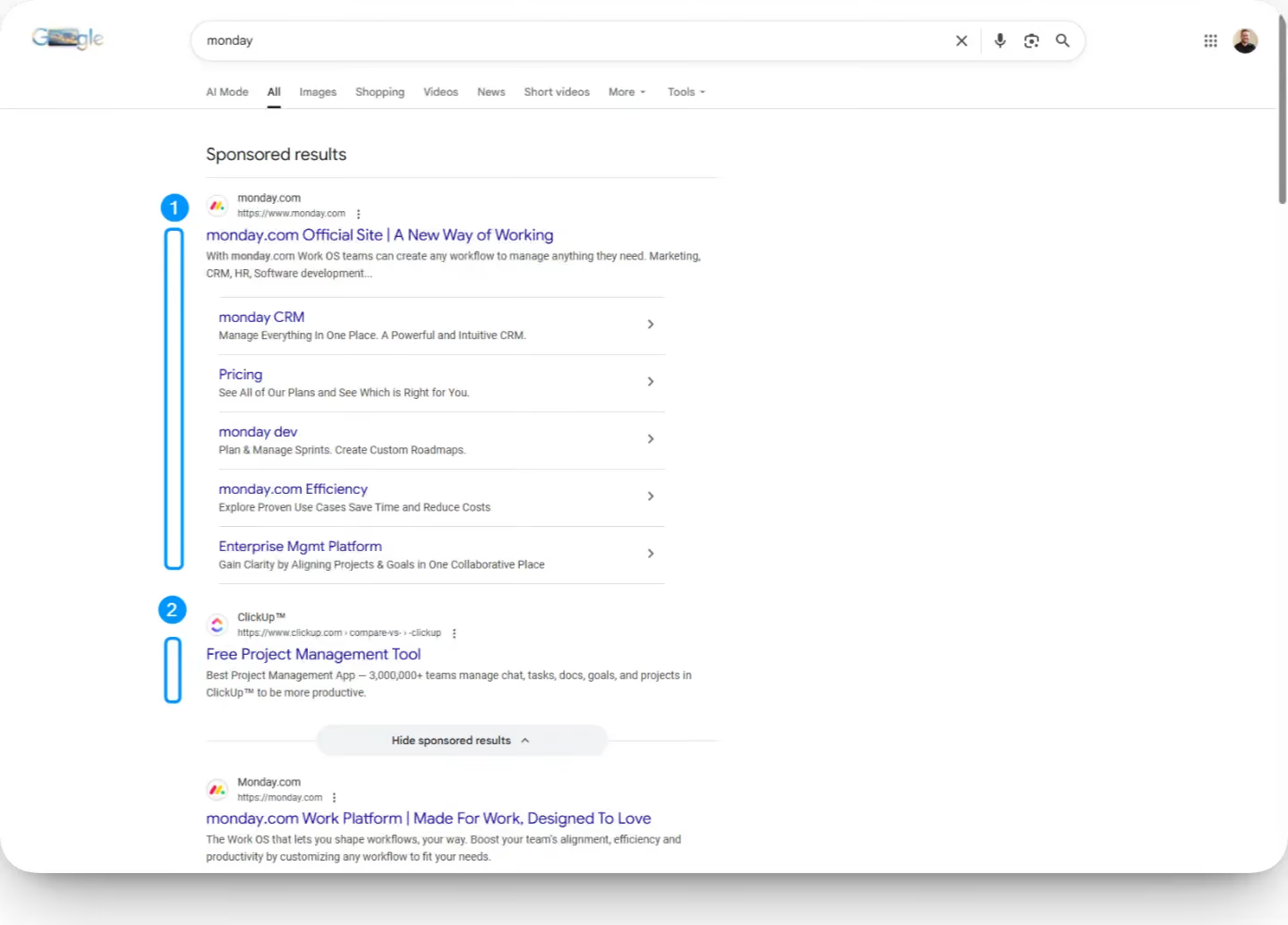
Text-only ads and very few extensions.
Ask yourself this: which ad would you click on, option 1 or option 2?
Why It Hurts
- Text-only ads take up less visual real estate on the search results page.
- Fewer clicks and weaker expected click through rate.
- Competitors with more complete ads win the auction more often.
Quick Fix
- Add sitelinks, callouts, structured snippets, call extensions, and location extensions where relevant.
- Use multiple headlines and descriptions so the system can test combinations.
- Your goal here is to take up as much of the screen as possible.
7. No Consistent Negative Keyword Pruning
Problem
Search terms are full of irrelevant queries that aren’t generating clicks.
Why It Hurts
- Budget leaks into searches that do not fit your services, ideal customer, or offer.
- Lower relevance leads to weaker CTR and expected CTR. Google responds by showing your ads less often and charging more per click.
Quick Fix
- Review search terms on a regular basis and add irrelevant ones as negative keywords.
- Build a shared negative keyword list for common filters such as jobs, careers, DIY, free, and competitor names you never want to pay for.
8. Broken CRM Attribution
Problem
Leads show up in your CRM with “unknown” source.
Why It Hurts
- You cannot tell which campaigns create real opportunities or sales.
- Decisions are based only on number of conversions and not revenue.
Quick Fix
- Pass UTM parameters into your forms and implement phone tracking.
- Make sure the CRM captures source, medium, campaign, and keyword when possible.
- Run reports that connect revenue back to those fields.
9. No Call Tracking
Problem
Similar to #8, phone heavy businesses miss half or more of their conversions because they aren’t tracking phone calls.
Why It Hurts
- Google Ads sees fewer conversions and does not optimize to get more of these quality leads.
- Smart bidding has weaker data.
- You undervalue campaigns that are actually driving calls.
Quick Fix
- Use a call tracking software (preferably) or Google forwarding numbers.
- Track at least two events:
- Calls from ads
- Calls from the site
- Tie call data back to real leads and booked jobs in your CRM when possible.
10. Incorrect Location Targeting Settings
Problem
Using the Presence Or Interest setting when you only want real local customers. This is small setting under your location targeting and by default Google sets this to Presence Or Interest. This means if someone is interested in traveling to your town and then search for “HVAC near me” your ad could show to someone in Alaska - not ideal.
Why It Hurts
- Budget gets spent far outside your true service area.
- Lead quality suffers. Smart bidding optimizes in the wrong direction.
Quick Fix
- In location options, choose Presence only for people in or regularly in your targeted locations.
11. Over Reliance On Automated Assets And AI
Problem
Google builds incredible tools, but remember their goal is still to increase ad spend. Letting Google quietly take the reins on your ads with very little oversight can lead to messaging changes, unexpected targeting, and spend going places you never intended.
Why It Hurts
- Automated assets can change messaging, promises, or pricing.
- Over time you drift away from your real offer and brand.
- Performance may look fine on the surface while lead quality drops.
Quick Fix
- Turn these automated systems off or review them carefully. When accounts run fully on autopilot, messaging and budget allocation can slowly drift away from what actually drives good leads. Long story short: Never take gambling advice from the casino.
Enjoy this document? Here are more things you might like:
→ Join our newsletter : Short monthly emails with ideas you can use to improve your marketing and grow a healthier business.
→ Schedule a chat : Talk with Davis, get an audit of your account, and see if we can help. Let’s jump on Google Meet.

